📖 Read the handbook online: follow the lessons from your first fixture run to an agent with clear limits.

The model proposes, the code disposes#
AUTONOMOUS SECURITY / THE BUILDER'S FIELD MANUAL
Read the website · Start the course · Run the lab · Connect your model · The build sequence
A practical handbook for building autonomous security agents with explicit limits on what a model may decide. Learn how to turn observations into a plan, admit only permitted actions, bind findings to evidence, and account for work that could not be completed.
The model remains probabilistic. The host application owns authorization, allowed actions, evidence records and acceptance. Replaying frozen inputs and policy can reproduce those control decisions; it does not make a live target or model response repeatable.
Start here#
You should be comfortable reading basic Python, JSON and HTTP. Follow the core route from the first run through the assembled application. The dispatch lesson points you to a short baseline selection contract; the adaptive controllers are optional after the core build. Along the way, you edit starter files and run checks that fail until your code works. The course runs offline without an API key or target connection.
The reading website presents the lessons in order, with navigation, diagrams and search. Use the website guide to build or preview it locally.
From a local copy of this repository:
python3 -m venv .venv
source .venv/bin/activate
python3 -m pip install -r requirements.txt
python3 -m harness.demo --out /tmp/harness-report.json
diff -u harness/report.json /tmp/harness-report.json
python3 -m pytest tests/test_harness.py
This release is verified on CPython 3.14. Earlier Python versions are not part of the release evidence; if you use one, run the complete gate sequence below before relying on the result.
When the report matches the committed example, diff prints nothing. Open the report and follow the header finding from its proposed severity to its governed severity. Then inspect the rejected raise and the synthetic marker's permitted raise. Both findings still require human review.
Read the input manifest, the implementation, and the adversarial tests beside the example report. You have completed this introduction when you can explain why an action was permitted, why a raise was refused, and what the report's coverage counts actually measure.
The default harness lab makes no network request and calls no model. Its proof predicate is synthetic, its host and adapters are trusted, and every finding is marked as requiring human review. The lab does not implement a person's acceptance or report-signing workflow. A verbatim quote establishes citation integrity, not exploitability. Fewer model calls and less rework are design objectives, not savings measured by the corpus.
Connect your model#
Your model supplies proposals. The application keeps policy and state, checks each proposal, runs permitted fixture actions and records the result. This repository gives you the application and exercises; you supply the model connection.
your model -> JSON proposal -> application checks -> fixture tool -> evidence + report
                                  |
                             reject or stop
Run the assembled application with its fake model transport first:
python3 -m examples.app_agent --out /tmp/agent-report.json --store /tmp/agent-memory.db
python3 -m pytest tests/test_app_agent_example.py -q
Inspect the proposal statuses and evidence in /tmp/agent-report.json. Then follow Connect your own model to use a local model or write a transport wrapper. The older model bridge remains a smaller connection exercise with a different proposal format. Both examples keep tool actions on fixtures, including when a real model supplies the reply.
The guide names what to replace, the JSON to return, the checks to keep, the expected report and the remaining work before adding live tools.
The control boundary#
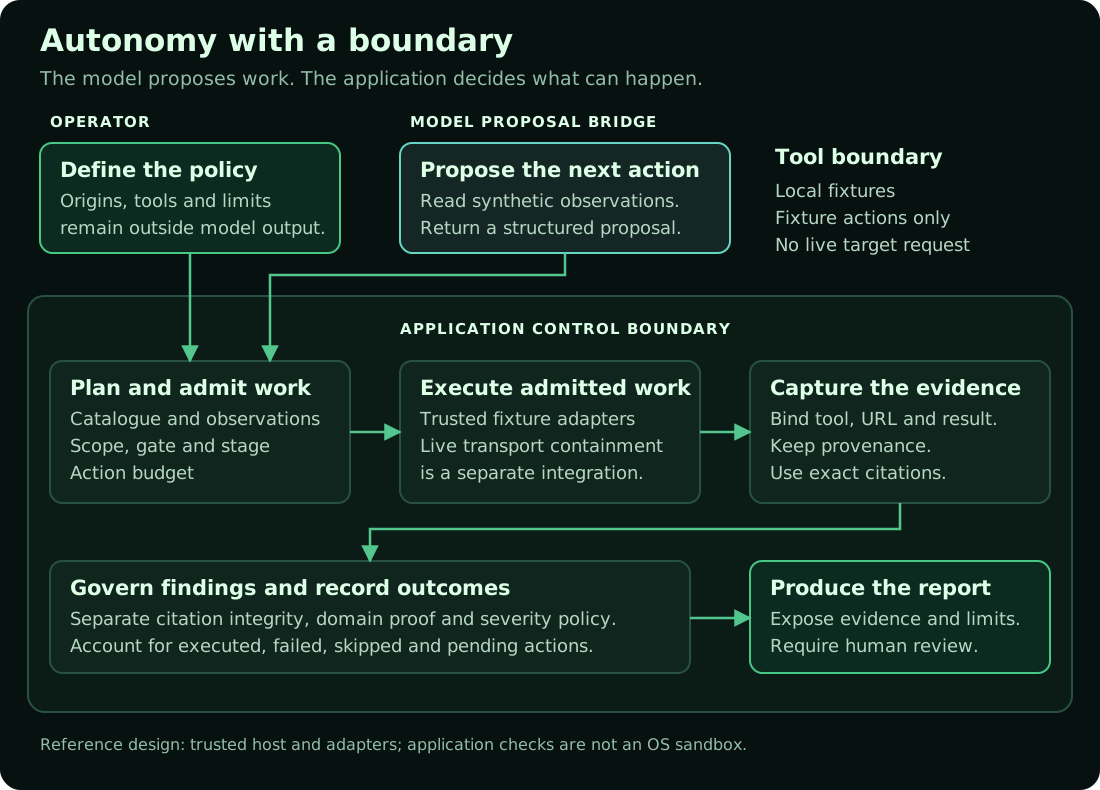
The diagram combines the lab's controls with the proposal connection. The model bridge exercises action admission and evidence capture; the default lab separately demonstrates finding governance. Neither is a complete live security agent.
Build your agent in this order#
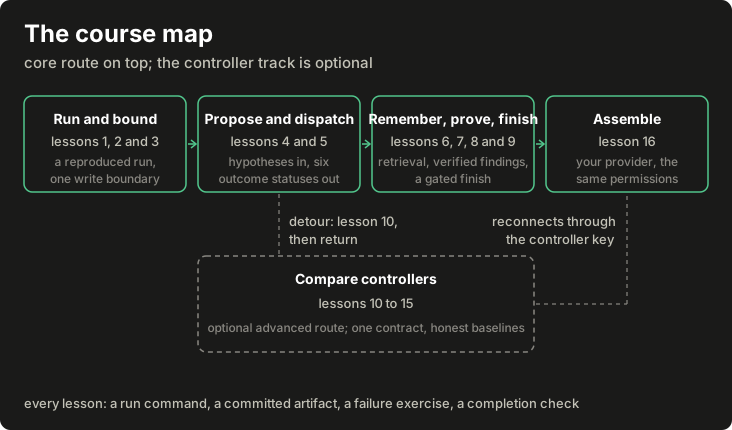
Any diagram opens at full size when you click it; on a narrow screen you can also scroll it sideways.
This is the learning order. At runtime, authorization and the gate precede dispatch. Each lesson should leave you with a small component, an adversarial test, and an artifact you can inspect.
| Build step | Lessons | Current coverage |
|---|---|---|
| Run and trace a complete fixture run | Lesson 1 | Runnable, byte-reproducible report |
| Bound the agent: policy, records, one write boundary, enforced stages | Lessons 2 and 3 | Runnable, with recorded refusals |
| Connect model proposals with validation and bounded repair | Lesson 4 | Runnable fake provider; hostile-text refusal demonstrated |
| Select and dispatch work with distinct outcomes | Lesson 5 | Runnable; six-status ledger |
| Retrieve memory and assemble context without losing constraints | Lessons 6 and 7 | Runnable; component scores and an omissions record |
| Verify evidence and review findings | Lesson 8 | Runnable; false rejections kept visible |
| Stop, recover and finish accountably | Lesson 9 | Runnable; resume never invents success |
| Assemble the application around your model | Lesson 16 | Runnable, configuration-driven, gated completion |
| Investigate adaptive selection after the core build | Optional controller lessons | Runnable controller laboratory, learning off by default |
Earlier components under core/ (the flat modules) and walkthrough/ preserve the historical case study, including known defects; the course's teaching packages live beside them under core/run/, core/memory/ and core/controller/. Use the case study to understand why a control exists and what went wrong before it, and the evidence register for what the studies behind this book did and did not show.
The course#
| Lesson | Subject |
|---|---|
| Run the whole thing first (source) | A complete synthetic run, traced record by record, then deliberately broken |
| Policy, records and the write boundary (source) | Policy objects, record schemas, digests and the one recording door |
| Stages and observations (source) | The operational stage machine, its harness mapping and measured-or-unknown observations |
| A model that proposes useful work (source) | The provider wrapper, hypothesis validation, bounded repair and the hostile-text refusal |
| Candidates and dispatch (source) | Eligibility with reasons, deterministic ranking and the six-status executor |
| Retrieval and persistent memory (source) | Four-tier records, hybrid search with component scores, structured lanes and refutation |
| Context assembly (source) | Tier budgets, whole-block drops, expiry and the omissions record |
| Evidence, verification and consolidation (source) | Captures, an isolated verifier, host-validated verdicts and consolidation |
| Stop, recover and finish (source) | Budgets with owners, checkpoints, reconciliation and the gated finish |
| The controller laboratory (source) | One selection contract, the shared feedback signal and two baselines |
| LinUCB step by step (source) | The contextual bandit, worked by hand and recomputed by test |
| The mushroom-body controller (source) | Sparse coding, soft competition, habituation and replayable selection |
| Plasticity, delayed credit and priors (source) | Eligibility traces, clipped local updates and the prior bank's recorded defect |
| Graph controller experiments (source) | The experimental edge-plastic arm, its topology controls and its honest limits |
| Comparisons and interpretation (source) | Frozen manifests, raw-before-summary analysis and scoped readings |
| Package an agent around your model (source) | The assembled application, checks that remain stable when components change, and the gated finish |